



Table of content
- Payroll compliance in construction: What employers can learn from Fair Work cases
- Why is MA000020 payroll compliance hard to get right?
- Case 1 — The flat-rate trap (multi-layer underpayment)
- Case 2 — Unpaid leave on termination
- Case 3 — The junior who was owed the adult rate (misclassification)
- The common thread: four failure points
- How Workstem builds MA000020 compliance in
- FAQs about the Construction industry
- Get your MA000020 payroll right the first time
- Read more
How can construction employers avoid payroll underpayments?
Construction payroll compliance is complex because the Building and Construction General On-site Award (MA000020) combines classification-based pay rates, overtime and penalty rates, allowances, RDOs, leave loading and superannuation requirements. The most common risks are using outdated award rates, applying the wrong overtime or penalty rate, miscalculating superannuation, and missing classification-specific exceptions.
Employers can reduce these risks by using award-interpreting payroll software that automatically applies the correct award rules, updates rates by their effective date, calculates entitlements from timesheet data, and separates superannuation-eligible and non-eligible payments correctly.
Payroll compliance in construction: What employers can learn from Fair Work cases
The Building and Construction General On-site Award (MA000020) is one of the hardest awards in the country to pay correctly, and the Fair Work Ombudsman (FWO) is watching. Between 10 November 2022 and 30 June 2025, the FWO recovered nearly $16.5 million in unpaid entitlements across the building and construction sector. Most of those underpayments were not fraud, instead they were payroll systems interpreting a complex award by hand and getting the edges wrong.
This article walks through three construction underpayment cases, shows exactly which MA000020 rule each one breached, and demonstrates how Workstem’s automated award interpretation would have paid every worker correctly the first time. If you run payroll for on-site construction workers, these are the calculations that decide whether you end up in an FWO Compliance Notice.
Why is MA000020 payroll compliance hard to get right?
MA000020 covers on-site building and construction workers across eight classification levels, from CW1 (entry-level construction worker) to CW9 (project or site manager). On top of the base rate, a single pay run can involve junior and apprentice percentages, an all-purpose industry allowance, tool and site allowances, penalty rates for Saturday, Sunday, and public holiday work, two-tier overtime, Rostered Day Off (RDO) accrual, and 17.5% annual leave loading. Each of these interacts with the others.
The award also changes every year. The Fair Work Commission (FWC) handed down its Annual Wage Review 2026 decision lifting modern award rates by 4.75% from 1 July 2026, which reset every rate in the table below. A payroll system that does not version rates by date will silently underpay the moment a new financial year begins.
Here are some of the classification and rate references the cases below draw on as per 1 July 2026. Please refer to Fair Work for the full guide
Weekly hire for full-time and part-time
| Level | Classification | Weekly rate | Hourly rate |
|---|---|---|---|
| CW1(level a) | Construction worker — entry level | $1,101.24 | $28.98 |
| CW1(level b) | Entry level | $1,121.76 | $29.52 |
| CW1(level c) | Entry level | $1,135.82 | $29.89 |
| CW1(level d) | Entry level | $1,155.20 | $30.40 |
| CW2 | Basic skilled | $1,177.62 | $30.99 |
| CW3 | Painter or glazier | $1,220.18 | $32.11 |
| CW4 | Signwriter | $1,256.66 | $33.07 |
| CW5 | Tradesperson – Refractory bricklayer | $1,312.90 | $34.55 |
| CW6 | Advanced tradesperson / leading hand | $1,315.56 | $34.62 |
| CW7 | Supervisor | $1,351.66 | $35.57 |
| CW8 | Carpenter-diver | $1,747.24 | $45.98 |
| CW9 | Project manager | $1,406.38 | $37.01 |
Casuals
| Level | Classification | Casual hourly |
|---|---|---|
| CW1(level a) | Construction worker — entry level | $35.10 |
| CW1(level b) | Entry level | $35.76 |
| CW1(level c) | Entry level | $36.21 |
| CW1(level d) | Entry level | $36.83 |
| CW2 | Basic skilled | $37.54 |
| CW3 | Painter or glazier | $38.58 |
| CW4 | Signwriter | $39.74 |
| CW5 | Tradesperson – Refractory bricklayer | $40.90 |
| CW6 | Advanced tradesperson / leading hand | $41.94 |
| CW7 | Supervisor | $43.09 |
| CW8 | Carpenter-diver | $44.09 |
| CW9 | Project manager | $44.84 |
Apprentices are paid a percentage of the CW5 rate (Year 1: 55%, Year 2: 75%, Year 3: 85%, Year 4: 95%). Juniors are paid a percentage of the adult rate by age with one important exception covered in Case 3.
The penalty structure is where manual interpretation breaks down most often:
| Day / type | First 2 hours | After 2 hours | Notes |
|---|---|---|---|
| Monday–Friday (ordinary) | 100% | 100% | Within 6am–6pm span |
| Monday–Friday overtime | 150% | 200% | Outside ordinary hours |
| Saturday overtime | 150% | 200% | Within agreed Saturday hours |
| Saturday overtime (after 12pm) | 200% | 200% | Beyond ordinary Saturday hours |
| Sunday | 200% | 200% | All Sunday work |
| Public holiday | 250% | 250% | Minimum 4-hour engagement |
Case 1 — The flat-rate trap (multi-layer underpayment)
In December 2025, the FWO secured a $6,000 penalty in the Federal Circuit and Family Court against a Melbourne sole trader who operated a construction business, for failing to comply with a Compliance Notice to back-pay a full-time construction worker employed from June to October 2023. The worker was aged 21 which is considered an adult under the award.
The breach
The employer paid a flat $24.00 per hour for every hour worked, across roughly 18 weeks. A single flat rate ignores three separate MA000020 obligations at once: the correct ordinary rate, penalty rates for overtime, and the leave entitlements owed when employment ends. The correct ordinary rate for this CW1(a) day worker using the latest rate for example is supposedly $28.98 per hour.
The numbers
The table below reconstructs a compliant calculation for the same hours. (The dollar figures are an illustrative reconstruction of the entitlements, not the court-published amount, which is related to the Compliance Notice penalty.)
| Component | Calculation | Amount |
|---|---|---|
| Ordinary shortfall | ($28.98 − $24.00) × 38 hrs × 18 wks | $3,406.32 |
| Overtime shortfall | [(OT hours at 150% × $28.98 × 1.5) + (OT hours at 200% × 28.98 x 2.0)] – (24.00 × total OT hours) | $2,534.76 |
| Leave on termination | $28.98 × 52.6 hrs × 1.175 (incl. 17.5% loading) | $1,791.11 |
| Total back-pay | $7,732.19 | |
| Super owed (ordinary shortfall only) | $3,406.32 × 12% | $408.76 |
Note the super boundary: SG is owed on the ordinary earnings shortfall, but not on the overtime or the termination leave payout, because neither is Ordinary Time Earnings (OTE). Getting that wrong in either direction is itself a compliance error.
How Workstem prevents it
The flat-rate trap disappears the moment ordinary hours, overtime, and termination are separate, rule-driven pay items rather than one number typed by hand. In Workstem, the base rate is a pay item linked to the CW classification, overtime is a formula that reads timesheet hours and applies the 150%/200% split automatically, and the super item is configured to include ordinary earnings while excluding overtime.
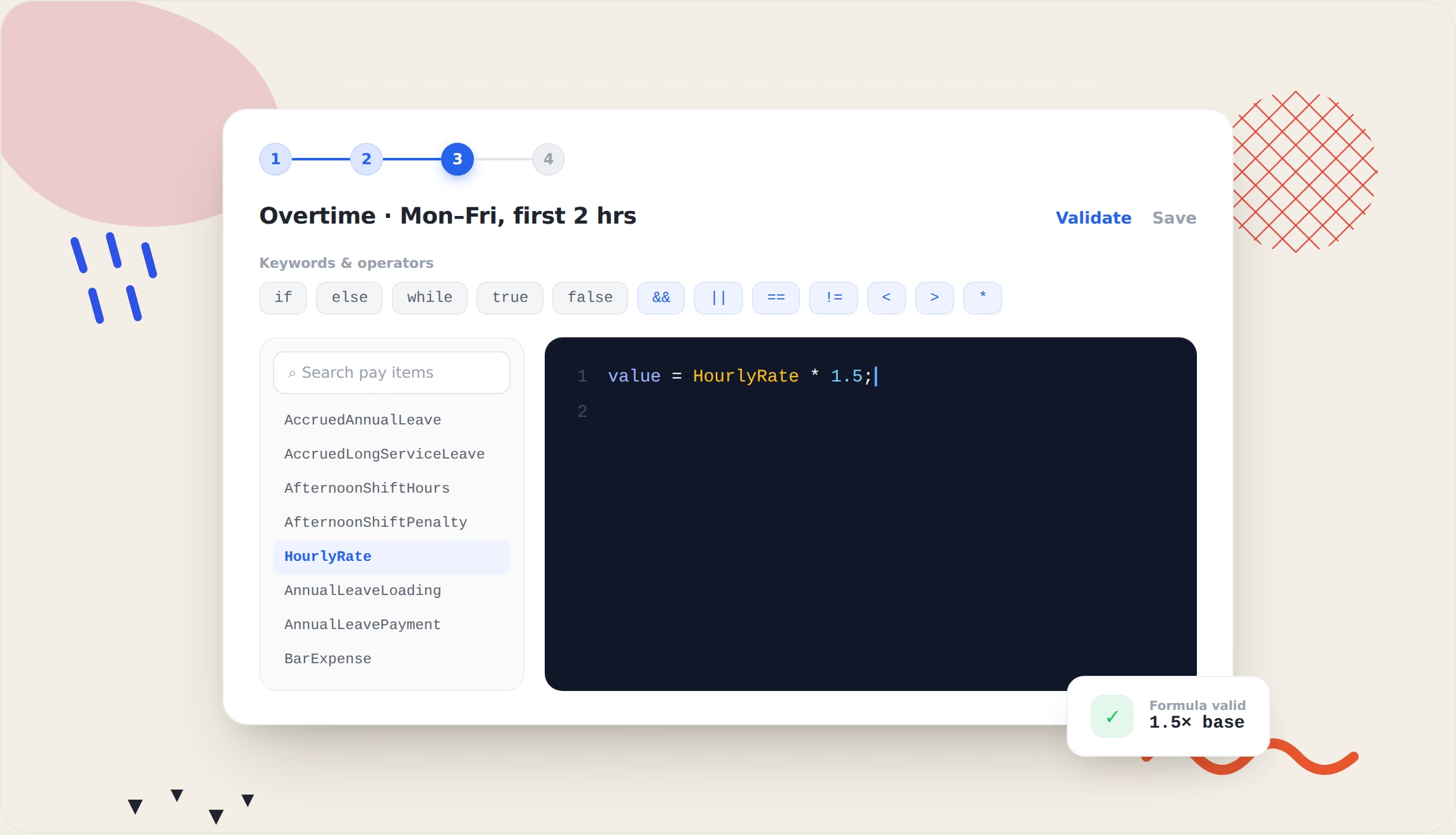
Figure 1. Overtime first 2 hours
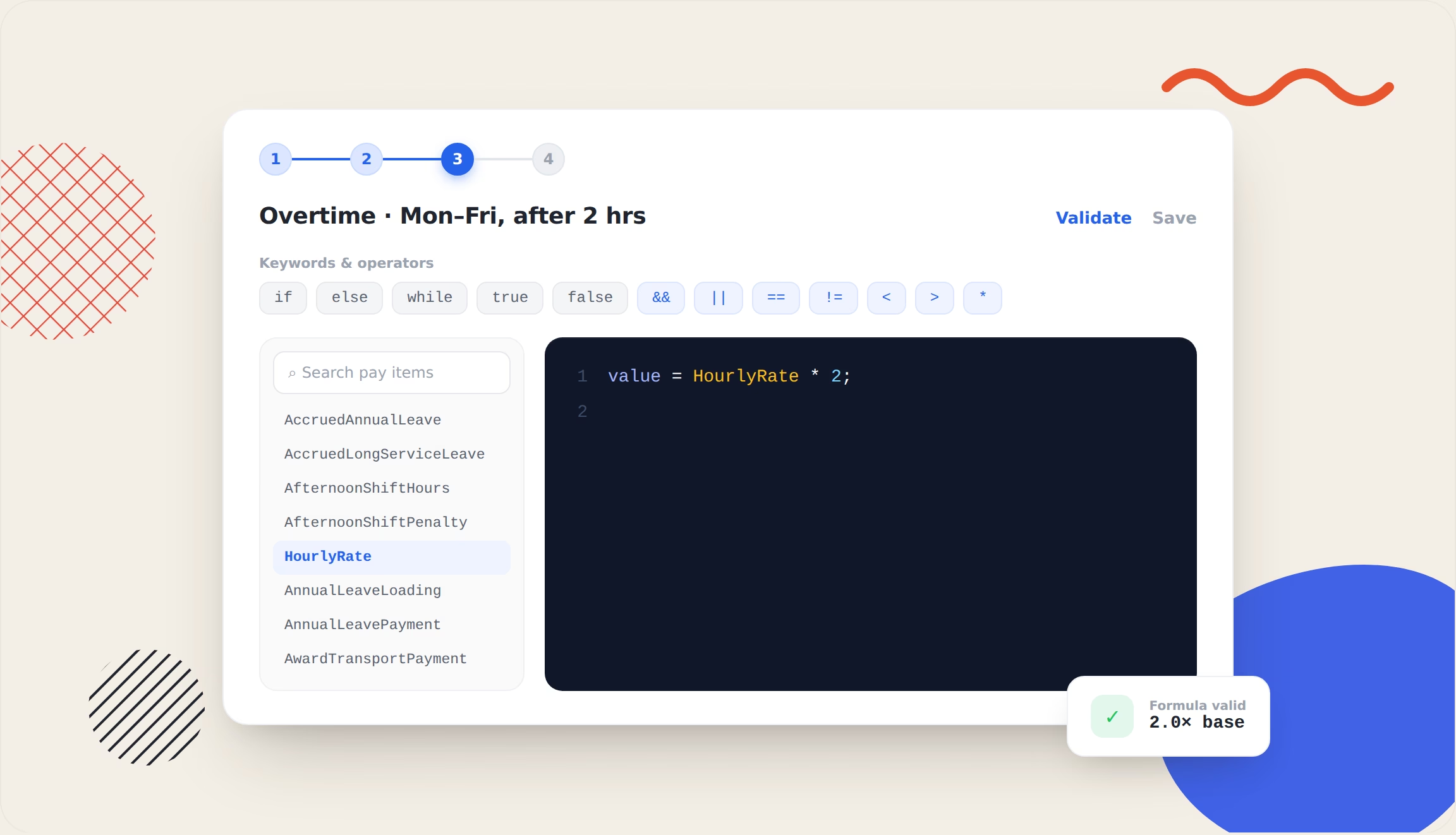
Figure 2. Overtime after 2 hours
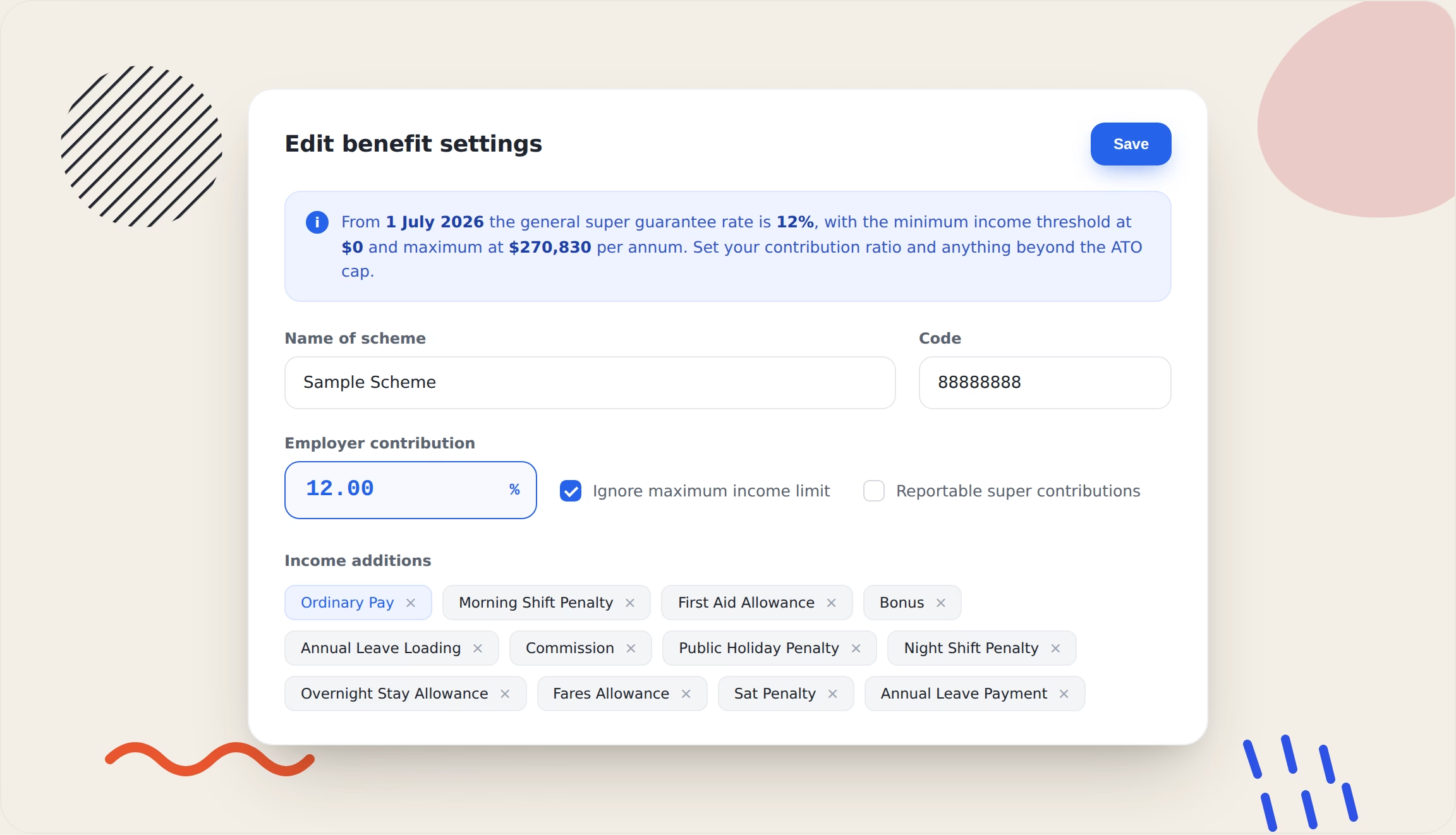
Figure 3. Super calculation
Figure 1 & 2 shows the Monday–Friday overtime pay item settings. Overtime is a rule the engine applies from timesheet data, drawing on the award-variable library. The multiplied overtime rates and the ordinary-earnings and OTE items used to keep super correct is shown in figure 3.
| What breaks manually | Workstem configuration |
|---|---|
| Flat rate ignores the award ordinary rate | Base pay item linked to CW1–CW8 classification rate |
| Overtime paid at flat rate | Overtime formula: MIN(OT,2) × rate × 1.5 + MAX(OT−2,0) × rate × 2.0 |
| Super calculated on the wrong base | Super item set to include ordinary earnings, exclude overtime (not OTE) |
| Leave forgotten at termination | Termination workflow auto-calculates accrued leave + 17.5% loading |
Automate award entitlements for the Building and Construction Award →
Case 2 — Unpaid leave on termination
The breach
A full-time skilled worker in the Northern Territory left after around nine years of service with six weeks (228 hours) of accrued annual leave never paid out. Under the National Employment Standards (NES) and the award, all accrued annual leave must be paid on termination, with 17.5% leave loading for non-shift workers, calculated at the rate applying on the termination date.
The numbers
| Component | Calculation | Amount |
|---|---|---|
| Annual leave payout | $32.11 × 228 hrs × 1.175 | $8,602.27 |
| RDO payout | No RDO balance in this scenario | $0.00 |
| Super owed | Termination leave lump sum is not OTE | $0.00 |
| Total owed | $8,602.27 |
Two subtleties trip up manual payroll here. First, the payout must use the termination-date rate, so a system that stores a single static rate per employee will underpay every long-tenured worker after an Annual Wage Review. Second, no super is payable on an unused-leave lump sum, so a system that blanket-applies SG to all payments will over-contribute and misreport through Single Touch Payroll (STP).
How Workstem prevents it
Workstem tracks leave balances continuously and revalues them at the current rate, so a termination payout is never calculated against an old figure. The termination workflow itemises annual leave, loading, and RDO separately, and the super setting for each termination pay item.
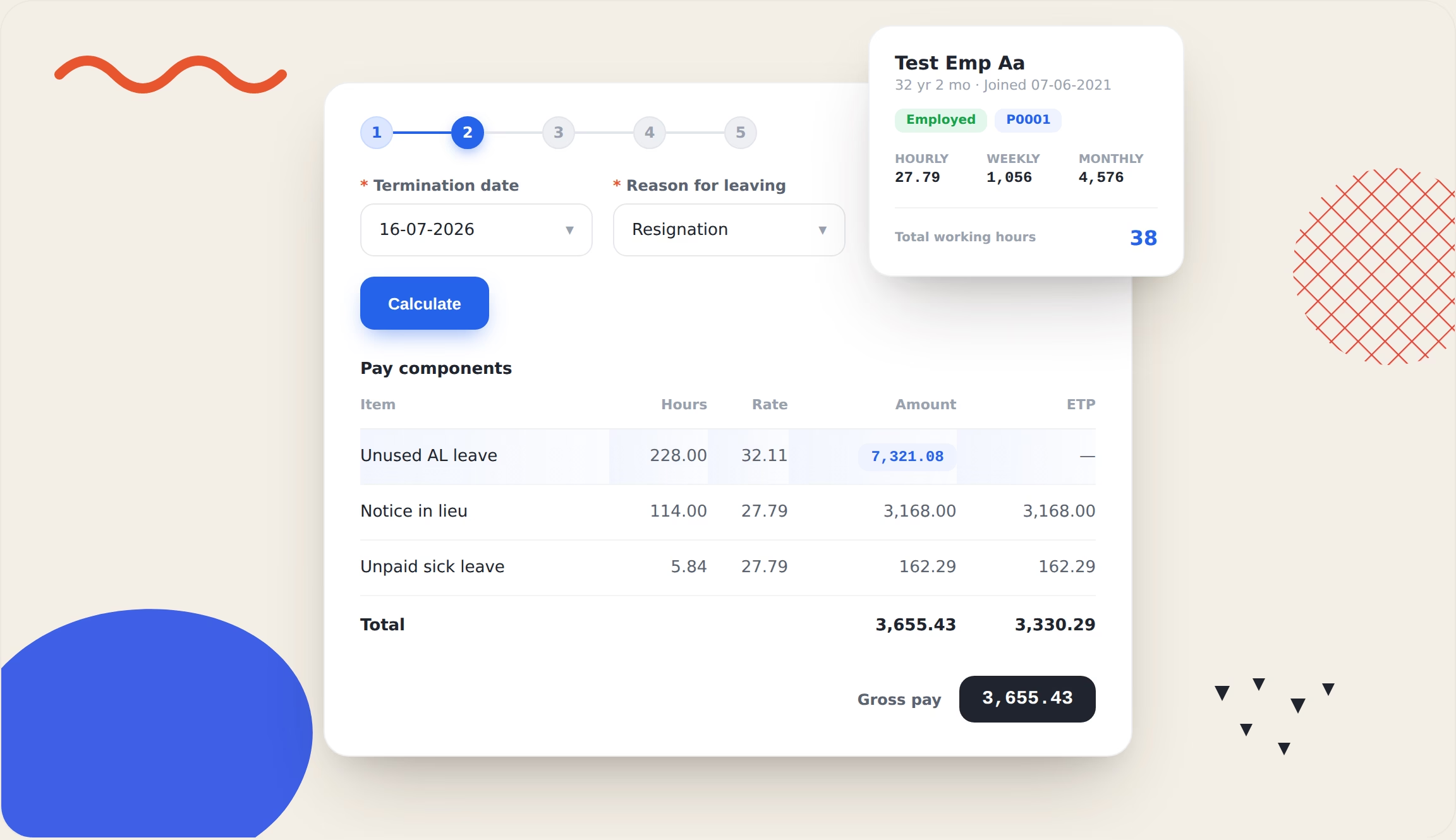
Figure 4. Leave on termination tracked
| What breaks manually | Workstem solution |
|---|---|
| Payout uses an old rate | Leave balance revalued at termination-date rate |
| Loading forgotten | Annual leave payout formula applies × 1.175 automatically |
| Super wrongly applied to the lump sum | Termination pay item flagged “Not OTE” — SG = $0 |
| RDO balance left unpaid | RDO balance auto-surfaced and paid atordinary rate |
Find out how to get award interpretation right →
Case 3 — The junior who was owed the adult rate (misclassification)
The breach
A 15-year-old casual working under classification CW1(a) in New South Wales went completely unpaid for their final two weeks 76 hours at $0.00. There are two award rules in play, and generic payroll gets both wrong.
First, MA000020 has a specific exception: the CW1(a) new-entrant classification is paid the adult rate regardless of age. A system that applies the standard junior percentage (a 15-year-old would normally sit at 55% of the adult rate) underpays by nearly half. Second, the worker is casual, so a 25% casual loading applies on top of the base rate, and that loading counts as OTE for super.
The numbers
| Component | Calculation | Amount |
|---|---|---|
| Casual hourly (adult, no junior discount) | $35.10 × 1.25 | $43.88 |
| Gross owed | $43.88 × 76 hrs | $3,334.50 |
| Actually paid | — | $0.00 |
| Underpayment | Gross unpaid | $3,334.50 |
| Super owed | $3,334.50 × 12% (casual loading is OTE) | $400.14 |
| Total (gross + super) | $3,734.64 |
This case also engages the casual minimum engagement rule; each casual shift must be at least four hours and the requirement to round all money to the nearest cent.
How Workstem does it
The junior exception is exactly the kind of edge case that a hard-coded age rule ignores and a configurable formula handles. In Workstem, the base-rate formula checks the classification first: if it is CW1(a), the adult rate applies; otherwise the age-based junior percentage runs. The casual loading is a separate 25% item that is correctly included in the OTE base for super.
The underlying rule, in Workstem’s formula editor, reads the employee’s classification and age and resolves the correct base rate with the logic shown below:
// CW1(a) new-hire: adult rate regardless of age; else junior % by age
if (classification == ‘CW1(a)’) {
if (age < 16) { value = HourlyRate* 0.55; }
else if (age == 16) { value = HourlyRate* 0.65; }
else if (age == 17) { value = HourlyRate* 0.75; }
else if (age == 18) { value = HourlyRate* 0.85; }
else if (age == 19) { value = HourlyRate* 0.95; }
else { value = HourlyRate* 1.00; // adult rate, no junior discount}
} else {}
| What breaks manually | Workstem solution |
|---|---|
| Junior % wrongly applied to CW1(a) | Classification-aware formula returns adult rate for CW1(a) |
| Casual loading missed | Casual pay item applies 25% loading on base |
| Super under-calculated | Casual loading included in OTE base → SG = gross × 12% |
| Short shifts paid below minimum | Minimum engagement rule enforces 4-hour casual minimum |
The common thread: four failure points
Across all three cases, the breaches cluster into four failure points that any construction payroll must handle and manual award interpretation reliably gets wrong at scale.
| Failure point | What goes wrong | Cases affected |
|---|---|---|
| Rate versioning | Static rates not updated after the 1 July wage review; termination paid at old rate | 1, 2 |
| Penalty and overtime logic | Ordinary hours instead of penalty rates of 125%, 150% or 200% | 1 |
| The OTE / super boundary | SG applied to overtime or termination lump sums, or missed on casual loading | 1, 2, 3 |
| Classification exceptions | CW1(a) adult-rate rule and apprentice or junior percentages misapplied | 3 |
Each failure point is a configuration decision, not a matter of effort. That is precisely why a rules engine outperforms a spreadsheet: the rule is written once, versioned by date, and applied identically to every pay run.
How Workstem builds MA000020 compliance in
Workstem is an integrated HR and payroll platform with an award interpretation engine built for exactly this kind of complexity. Rather than asking a payroll officer to remember every rule, it encodes each award obligation as a configurable pay item, formula, or leave rule, then applies them automatically from timesheet to payslip to STP.
The implementation follows a structured checklist of 82 items across eight areas. The priority items the settings that must be correct before the first pay run and map directly to the failure points above.
| Area | P0 configuration in Workstem |
|---|---|
| Classification and pay rates | CW1–CW8 base rates as linked pay items; apprentice and junior formulas; annual rate-review process |
| Ordinary hours and RDO | 38-hour week with 4-week averaging; 6am–6pm span; RDO accrual at 0.4 hrs per day worked |
| Penalty rates and overtime | Saturday 125%/150%, Sunday 150%/200%, public holiday 225%, overtime 150%/200% |
| Allowances | All-purpose industry allowance; tool allowance (CW5+); tiered site allowance |
| Superannuation | SG at 12%; QE settings include all-purpose allowances and casual loading; STP Phase 2 |
| Leave | Annual leave with 17.5% loading; personal/carer’s leave; RDO as a tracked leave type |
| Termination and redundancy | Notice-period logic; building-industry redundancy; leave and RDO payout with correct super treatment |
| System setup | Award classification field; casual vs permanent loading; STP Phase 2 and pay-run approval |
Two current changes make this automation more valuable than it was even a year ago. Award rates increased 4.75% on 1 July 2026, so every base rate in a static system is now wrong until manually updated — Workstem versions rates by effective date. Payday Super, live since 1 July 2026, requires SG to reach the fund within seven business days of each pay day and calculates contributions on qualifying earnings (QE). A payroll platform that already separates OTE-eligible earnings from overtime and termination lump sums is the difference between a clean pay-day super run and prevents the Superannuation Guarantee Charge (SGC) liability.
FAQs about the Construction industry
Q1: What is the Building and Construction General On-site Award (MA000020)?
A1: MA000020 is the modern award that sets the minimum pay rates and conditions for on-site employees in the building and construction industry in Australia. It covers eight classification levels (CW1 to CW8), ordinary hours and Rostered Days Off, penalty and overtime rates, industry and site allowances, superannuation, leave, and termination and redundancy entitlements. It is maintained by the Fair Work Commission and updated each 1 July through the Annual Wage Review.
Q2: Why do construction employers underpay under MA000020?
A2: Most construction underpayments are calculation errors, not deliberate wage theft. The award layers junior and apprentice percentages, all-purpose allowances, two-tier penalty rates, RDO accrual, and 17.5% leave loading on top of the base rate, and each rule interacts with the others. Manual or spreadsheet-based payroll tends to fail at four points: keeping rates current after the annual wage review, applying tiered penalty rates, drawing the super (QE) boundary correctly, and calculating termination payouts.
Q3: Does casual loading count towards superannuation under MA000020?
A3: Yes. The 25% casual loading paid to casual construction workers forms part of Ordinary Time Earnings, so Super Guarantee is payable on the loaded rate. In practice, a casual paid $36.225 per hour ($28.98 base plus 25% loading) accrues super on the full loaded amount. From 1 July 2026, super is calculated on qualifying earnings under Payday Super, which similarly includes casual loading. Overtime and termination lump-sum leave payments, by contrast, are not OTE and do not attract super.
Q4: How does the CW1(a) junior exception work?
A4: Under MA000020, most junior employees are paid a percentage of the adult rate based on age. The CW1(a) new-entrant classification is an exception: it is paid the full adult rate regardless of the employee’s age. So a 15-year-old engaged as a CW1(a) new-entrant is entitled to the adult rate — not the 55% junior rate that would otherwise apply — plus casual loading if they are a casual. Applying a standard junior discount to a CW1(a) worker is a common and significant underpayment.
Q5: What happens to RDO and annual leave when a construction worker is terminated?
A5: On termination, all accrued annual leave must be paid out with 17.5% leave loading for non-shift workers, and any accrued RDO balance is paid at the ordinary rate. Both must be calculated at the rate applying on the termination date, not a historical rate. No superannuation is payable on the annual leave lump sum because it is not Ordinary Time Earnings. Long service leave may also be payable pro-rata under the relevant state or territory legislation.
Q6: How does payroll software prevent Fair Work underpayment claims?
A6: Award-interpreting payroll software encodes each award rule once — base rates by classification, penalty and overtime tiers, allowances, leave accrual, and termination logic — then applies them automatically to every pay run and versions rates by effective date. This removes the manual steps where errors occur, keeps rates current after each 1 July wage review, draws the super boundary correctly, and produces an auditable record for STP Phase 2 and Payday Super. The result is that the underpayments in the cases above are caught at calculation time, before they reach a payslip.
Get your MA000020 payroll right the first time
Every case above traces back to a rule that a person had to remember and apply by hand. Workstem’s award interpretation engine applies MA000020 the same way on every pay run — correct rates, correct penalties, correct super boundary, correct termination payout — and updates automatically when the award changes.
See how Workstem handles the Building and Construction Award →
This article is general information, not legal or workplace-relations advice. Award rates and rules change; confirm current entitlements against the Fair Work Commission wage sheet for MA000020 and, where needed, seek advice from a workplace relations professional.
Read more
Construction Payroll & Insights
Daily vs Weekly vs Casual Employment in Building and Construction Award (MA000020)
How to Avoid Fair Work Penalties for Unpaid Wages in Construction
Construction vs Other Industries: Pay & Conditions
Other award related articles
Building and Construction Award
Building & Construction Award (MA000020) Pay Rates 2026/27
Building & Construction Award [MA000020] 2025: Pay Rates & Rights