


Table of content
- What is Single Touch Payroll?
- What is STP reporting?
- What are the most common STP reporting errors?
- How do you fix an STP reporting error?
- What happens if an STP report is rejected?
- STP errors vs payroll errors
- How can employers prevent STP reporting mistakes?
- What is STP Phase 2?
- What changed for STP in 2026?
- STP reporting checklist
- Frequently asked questions
- How Workstem helps with STP2 reporting
- Read More
- STP Basics and Guides
- STP Resources and Insights
A payroll can be calculated correctly and still produce the wrong result if the information sent to the ATO is coded or reported incorrectly.
That is why Single Touch Payroll (STP) reporting errors can be frustrating: the employee may receive the right pay while the ATO receives the wrong classification, year-to-date amount or payroll information.
This guide explains the most common STP mistakes, why they happen, how to fix them, and what Australian employers should review in 2026.
Quick answer: STP reporting sends payroll information to the ATO each time employees are paid. Most reporting problems come from incorrect employee details, pay-code mapping, payment classifications, year-to-date figures, super information or failure to correct previous reports.
What is Single Touch Payroll?
Single Touch Payroll is the Australian payroll reporting system that requires employers to send employee payroll information to the ATO through STP-enabled software.
Employers report information such as remuneration, PAYG withholding and superannuation-related information through their payroll system.
The important point is that STP is not a separate report that payroll teams prepare after every pay run. The information is generally transmitted from the payroll or accounting software when payroll is processed.
What is STP reporting?
STP reporting is the process of sending payroll and withholding information to the ATO each time employees are paid.
Under STP Phase 2, reporting includes more detailed information about the type and components of payments.
For example, payroll systems may need to distinguish between salary and wages, overtime, allowances, bonuses, commissions, paid leave and other payment categories.
This means accurate payroll coding is now a critical part of accurate STP reporting.
What are the most common STP reporting errors?
The most common STP errors usually involve incorrect employee information, payment classifications, pay-code mapping, year-to-date figures or superannuation data.
1. Incorrect employee details
Incorrect employee information can cause STP records to be associated with the wrong person or create inconsistencies in ATO records.
Payroll teams should check details such as:
- Employee name.
- Tax file number.
- Date of birth.
- Employment start date.
- Employment type.
- Tax treatment.
- Residency or working-holiday-maker status where relevant.
An employee record should be checked before the first payroll submission rather than waiting for an error message.
2. Incorrect pay-code mapping
Incorrect pay-code mapping is one of the biggest risks under STP Phase 2 because different payment types can require different reporting treatment.
For example, overtime, bonuses, commissions and allowances should not automatically be treated as ordinary salary and wages.
A payroll system may calculate the gross amount correctly while still sending an incorrect payment classification to the ATO.
The result is a reporting problem rather than a basic arithmetic problem.
3. Reporting the wrong income type
Every payment should be assigned the appropriate STP income type.
The ATO’s STP Phase 2 guidance includes different income classifications, including salary and wages, working holiday maker income and certain closely held payee arrangements.
A common mistake is assuming that all employee payments belong under one generic income category.
Payroll teams should review the income-type mapping in their software and confirm it against current ATO requirements.
4. Incorrect year-to-date figures
Year-to-date figures should reconcile with the payroll records that produced them.
If an employee’s gross income, PAYG withholding or other reported amount is wrong, simply submitting the next pay run without correcting the underlying data can allow the discrepancy to persist.
Before finalising the financial year, employers should reconcile employee YTD figures against payroll reports and investigate unusual variances.
5. Incorrect allowances
Allowances require careful treatment because STP Phase 2 changed how many allowances are reported.
The ATO’s STP Phase 2 checklist specifically highlights the need to review allowance reporting and pay-code configuration.
For employers, this means payroll software should not simply carry old allowance mappings forward without review.
6. Incorrect salary sacrifice reporting
Salary sacrifice amounts need to be reported correctly under STP Phase 2.
The ATO specifically identifies salary sacrifice reporting as an area employers need to understand.
Payroll teams should review how salary sacrifice is represented in their software and confirm that the relevant amounts are being reported using the correct configuration.
7. Forgetting to update payroll after a correction
Correcting the payroll calculation without correcting the STP data can leave the ATO record inconsistent with the employer’s payroll records.
This is especially important when a historical pay run is changed.
The payroll team should confirm whether the correction needs to flow through a subsequent STP submission or requires another correction process supported by its software.
How do you fix an STP reporting error?
The correct fix depends on what was wrong, when it was reported and whether the error affected the current or previous financial year.
A practical correction workflow is:
Step 1: Identify the exact error
Do not start by changing random payroll settings.
First determine whether the problem relates to:
- Employee information.
- Gross payments.
- PAYG withholding.
- Payment classification.
- Allowances.
- Deductions.
- Salary sacrifice.
- Superannuation information.
- Year-to-date totals.
Step 2: Correct the source payroll data
Fix the underlying payroll record before trying to fix the report.
If the employee was paid incorrectly, correct the payroll calculation.
If the employee was paid correctly but the payment was categorised incorrectly, correct the relevant pay code or STP mapping.
Step 3: Check the reporting period
Determine whether the error belongs to the current financial year or a previous financial year.
This matters because the correction process can differ depending on the reporting period.
Step 4: Follow your software’s STP correction workflow
Use the correction function provided by your STP-enabled payroll software rather than manually altering unrelated payroll records.
Different payroll systems present corrections differently, so employers should follow their software provider’s current instructions alongside ATO requirements.
Step 5: Reconcile the YTD figures
After making the correction, check that the employee’s year-to-date figures now agree with the payroll records.
This is one of the simplest ways to catch a correction that has only partially resolved the original problem.
What happens if an STP report is rejected?
A rejected STP report should be investigated and corrected rather than ignored.
Start with the ATO response or error message returned by the payroll system.
The message should help identify the affected employee or reporting field.
Then:
- Read the error message.
- Identify the affected record.
- Check the employee’s payroll data.
- Correct the underlying problem.
- Resubmit or correct the report according to your software’s workflow.
- Confirm that the corrected report has been accepted.
- Keep an internal record of the correction.
Ignoring a rejected report can create downstream reconciliation problems.
STP errors vs payroll errors
An STP reporting error does not necessarily mean the employee was underpaid or overpaid. Consider this example.
An employee receives the correct $2,000 gross payment, but the payroll system incorrectly categorises $300 of that amount as an allowance instead of the appropriate payment type.
The employee’s bank payment may be correct. The STP report can still be wrong.
This distinction is important because payroll teams need to investigate both payment accuracy and reporting accuracy.
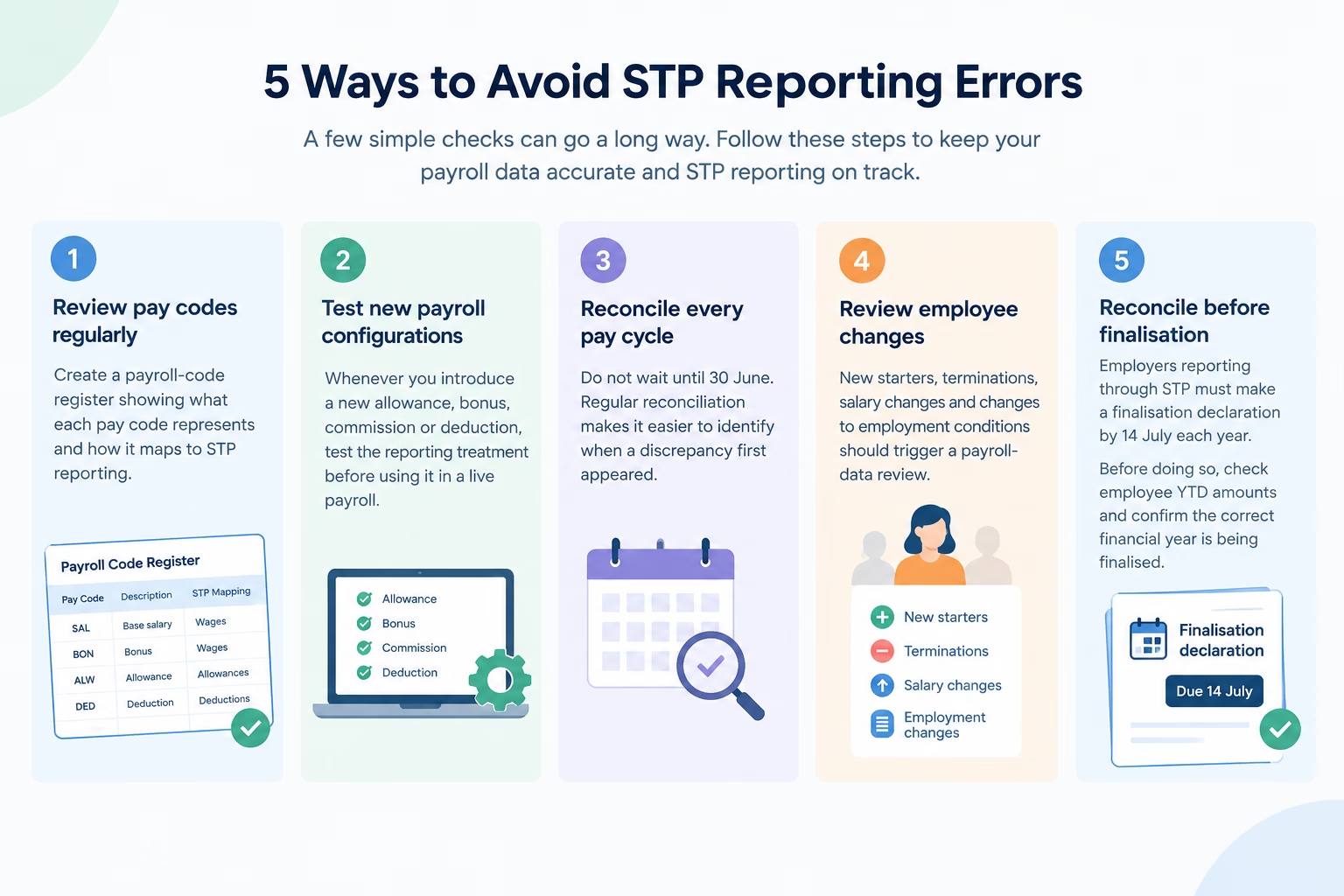
How can employers prevent STP reporting mistakes?
The best way to reduce STP errors is to prevent incorrect data from entering the reporting process.
What is STP Phase 2?
STP Phase 2 expanded the amount and detail of payroll information employers report through STP.
The ATO says Phase 2 includes information such as remuneration, income type, components making up payments, PAYG withholding and super liability information.
This additional detail is designed to reduce the need for employers to provide similar information separately to multiple government agencies.
For payroll teams, however, it means the quality of payroll data and pay-code configuration matters more than ever.
What changed for STP in 2026?
2026 is particularly important for payroll teams because Payday Super changes introduced additional STP-related reporting requirements.
From 1 July 2026, employers are required to report qualifying earnings and total super liability information through STP, with payroll software providers updating systems to support the changes.
This creates another reason to review payroll mappings and reconciliation processes rather than treating STP as a set-and-forget compliance task.
STP reporting checklist
Before submitting payroll, check:
- Employee details are correct.
- Employment classifications are correct.
- Pay codes are correctly mapped.
- Income types are correct.
- Allowances are correctly classified.
- Salary sacrifice is correctly reported.
- PAYG withholding reconciles.
- Superannuation information is accurate.
- YTD figures reconcile.
- Previous errors have been corrected.
- The STP submission has been accepted.
Frequently asked questions
Q1: What is STP in payroll?
A1: STP, or Single Touch Payroll, is Australia’s system for reporting employee payroll information to the ATO through STP-enabled payroll software.
Q2: What is STP reporting?
A2: STP reporting is the transmission of payroll and tax information to the ATO when employees are paid.
Q3: What are common STP reporting errors?
A3: Common errors include incorrect employee details, wrong income types, incorrect pay-code mapping, allowance classification errors, incorrect YTD figures and inaccurate superannuation reporting.
Q4: How do I correct an STP error?
A4: First identify and correct the underlying payroll or employee-data problem. Then use the correction process supported by your STP payroll software and reconcile the resulting YTD figures.
Q5: Do STP errors affect employees?
A5: They can. Incorrect STP data may affect the information employees see in their ATO income statement and may create additional work during tax time.
How Workstem helps with STP2 reporting
The most effective approach is not simply to fix errors after the ATO rejects a report. It is to build reliable payroll coding, reconciliation and review processes that prevent incorrect information from reaching the STP submission in the first place.
If your payroll team is still manually checking STP classifications and corrections, reviewing your payroll automation and reporting controls can reduce repetitive work while improving compliance confidence like how Workstem streamlines payroll and STP processes in one platform, helping your team reduce repetitive administration and keep payroll reporting organised.
Discover how we can help to simplify your payroll processes today!
Read More
STP Basics and Guides
STP Phase 2 Complete Guide 2026: Requirements & Compliance
Guide to Single Touch Payroll for Closely Held Payees
Guide to Single Touch Payroll Phase 2
Guide To Single Touch Payroll (STP)
STP Resources and Insights
Avoiding STP Penalties 2025: ATO Audit Guide & Risk Prevention
STP Phase 2 Australia: Post-Migration Compliance Guide & Requirements
Single Touch Payroll 2025: Everything Australian Employers Need to Know